

How To Reset Administrator Password In Windows Server 2012 R2
How to Reset Windows 2012 Server Administrator Countersign [2 Options]
 Alex Griffith Updated on Apr 14, 2022 6:41 PM
How do I reset administrator countersign on Windows Server 2012 R2 that's running on VMware Workstation without deleting any files? A long time away from using the machine, now I tin can't access it since I forgot the login password.
It comes the time that for some reason you may forget Windows Server 2012 ambassador password and locked yourself out of computer. Before going further, if your Server 2012 (R2) automobile is a DC in the domain, the outset affair you should do is check if at that place is whatever other user that has admin privileges. If then, you can apply that user to reset Windows server 2012 admin password.
If you accept no other ambassador business relationship, there is no need to worry, a lot of Windows Server 2012 password reset or recovery tools out there accept made information technology easy for you to recover or reset countersign in Windows Server 2012 R2 and go you dorsum in to system again.
Option 1: Reset Server 2012 password with installation CD
Losing countersign in Windows Server 2012 R2 seems scary at first, but luckily in that location'south a quick fix that will solve your problem. If yous accept a server 2012 Installation disk, you can hands reset administrator password on server computer.
- Insert the Windows Server 2012 installation CD/DVD and boot from it.
- From the Install Windows menu, click Next > Repair your computer.
- On the Choose and option interface, click on Troubleshoot.
- On the Advanced options interface, click Command Prompt.
- When command prompt pops upwardly, type the following commands:
- Close the control prompt and then click Continue.
- The server should now boot and present the logon screen. Here click Windows Central + U.
- Command prompt volition pop up, run the post-obit control:
d:
cd windows\system32
ren Utilman.exe Utilman.exe.old
re-create cmd.exe Utilman.exe
internet user administrator NewPassword
Brand sure you lot replace NewPassword with your own password. You should now be able to regain access to the server 2012 using the countersign you gear up in the final step.
For those who are running into arrangement errors, yous should get benefits from this article.
If this solution doesn't help reset Windows Server 2012 Admin password you lost or y'all don't have that disc, here is some other efficient solution.
Option 2: Apply Windows Server 2012 Password Reset Tool
Spower Windows Password Reset is, as the proper name implies, a bang-up tool when it comes to resetting Windows Server 2012 ambassador countersign without installation CD. It can crack the lost countersign chop-chop and log back onto system, no matter which type of business relationship you lot're using, domain admin account or a local account. It also works for other versions of Windows. What's more, it allows you to add a new account that has admin rights on your estimator.
In this article I will show you how to reset administrator password on a Windows Server 2012 (R2) Essentials, but it besides applies to a server running Server 2012 R2 Foundation, Standard or R2 Datacenter. The whole process is remarkably easy and quite quick.
Step 1: Run the software and create a password reset disc
Run this Windows Server 2012 R2 password reset software on any accessible computer, and plug in a bare USB flash bulldoze or CD/DVD media to motorcar.
On the main interface, click on the USB device or CD/DVD button, in the side by side screen click the Offset burning push button. The tool begins creating a password reset disk for Server 2012 (R2).
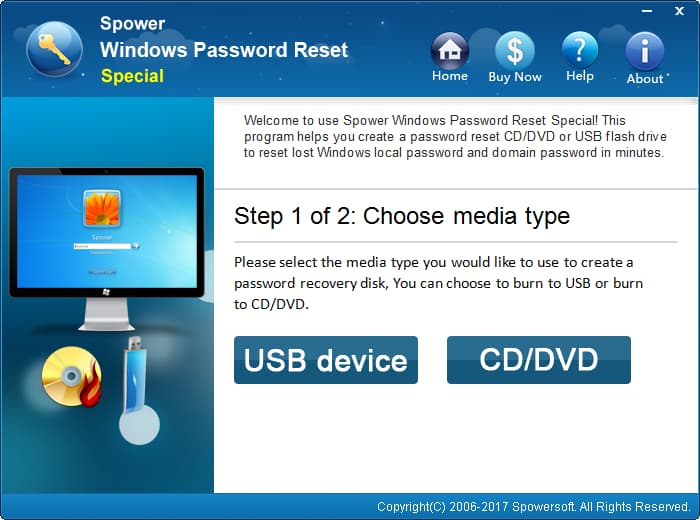
Once done, pull the disk out of the motorcar and insert information technology into your locked PC that you need to reset the admin countersign in Windows Server 2012 (R2).
Step two: Set locked PC to boot from the disk
Due to your figurer boots from difficult drive where has Windows Server 2012 installation normally, here y'all will have to change the boot order and set the Server 2012 password rest disk you just made as showtime kicking device.
- How to boot from a USB drive in Windows
- How to kick from CD/DVD-ROM in Windows
Step 3: Reset forgotten Windows Server 2012 Admin password
The estimator volition restart and boot from the password reset deejay start. You have to wait here (a minute or so) until it presents the program'southward screen, as shown below.
Now select your Windows Server 2012 system, and select the account that you need to reset the forgotten password from the list, and click Reset.
The tool begins doing its work and resetting the password for you lot. A few seconds afterward, the password volition be reset to exist Spower@2011 past default.
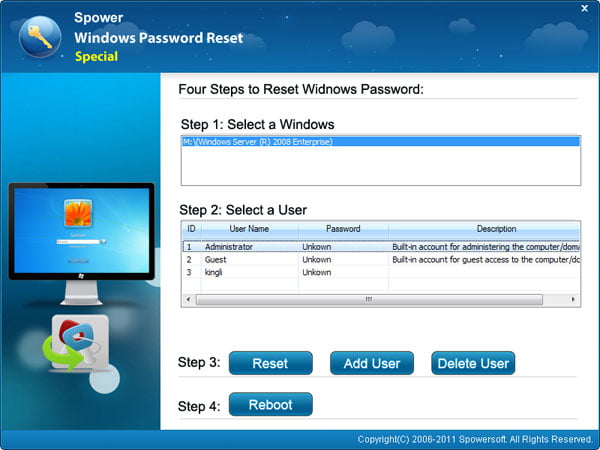
In additional to resetting Windows Server 2012 (R2) password, this program likewise comes with an Add User feature that allows user to create a new administrator account on the computer.
Related Article: How to Reset Windows 7 Password on HP
As the password is reset you can restart your computer past pressing Reboot button at the lesser of the screen, and remove the disk from the machine (!).
Now you tin log on to your computer with new password. Make sure to configure a new password to replace the default countersign that the tool made for you.
That's it!
Source: https://www.appgeeker.com/recovery/how-to-reset-windows-server-2012-domain-admin-password.html
Posted by: abrahamtifichatis.blogspot.com
0 Response to "How To Reset Administrator Password In Windows Server 2012 R2"
Post a Comment